Everything on these screens — which questions AI answers about you, which of your pages get cited, what to change — ends the same way: somebody opens an editor and edits a file. The MCP server removes the copying in between. Point Claude Code or Cursor at GetCited.me and the agent reads your visibility data itself, then writes the fixes into your repository.
It reads. It never spends a credit, never publishes anything, and never changes a setting.
What you need
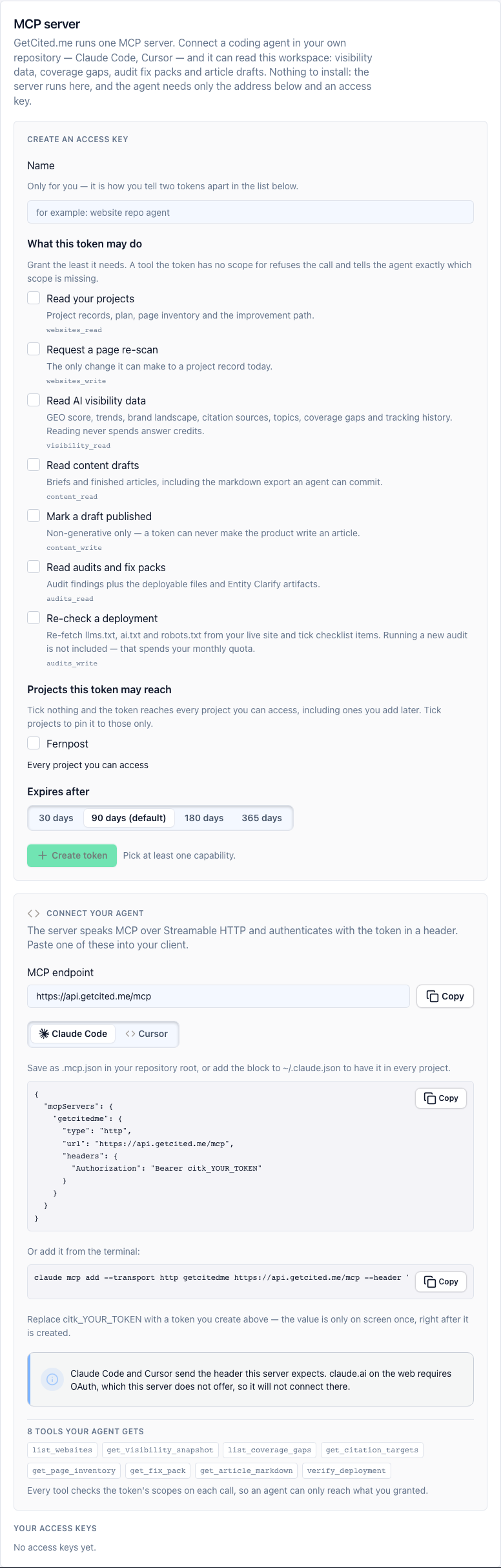
An API token. Open Settings → MCP server, create one, tick the scopes the agent should have, and — if you work on several projects — pin it to one. The value is shown exactly once: copy it then, because only a hash is stored. If you lose it, revoke it and make another; that takes ten seconds and is safer than keeping it somewhere it can leak.
Scopes are the whole security model here. A token with visibility_read can read your numbers and nothing else. Give an agent the narrowest set that lets it do the job you have in mind.
Connecting it
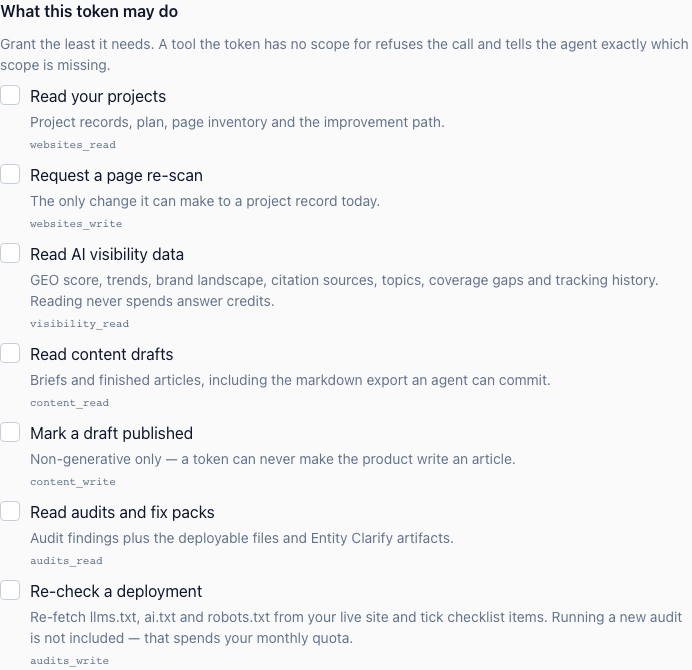
The server speaks Streamable HTTP at https://api.getcited.me/mcp, and both supported clients read a JSON file.
Claude Code — put this in .mcp.json in your repository, or in your user config to have it everywhere:
{
  "mcpServers": {
    "getcitedme": {
      "type": "http",
      "url": "https://api.getcited.me/mcp",
      "headers": { "Authorization": "Bearer citk_your_token" }
    }
  }
}
Or one line in the terminal:
claude mcp add --transport http getcitedme https://api.getcited.me/mcp --header "Authorization: Bearer citk_your_token"
Cursor — .cursor/mcp.json, and note there is no type key here; Cursor takes the transport from the https:// URL itself:
{
  "mcpServers": {
    "getcitedme": {
      "url": "https://api.getcited.me/mcp",
      "headers": { "Authorization": "Bearer citk_your_token" }
    }
  }
}
Both clients read MCP configuration at start, so restart yours. Ask the agent to list its tools; eight of ours should appear.
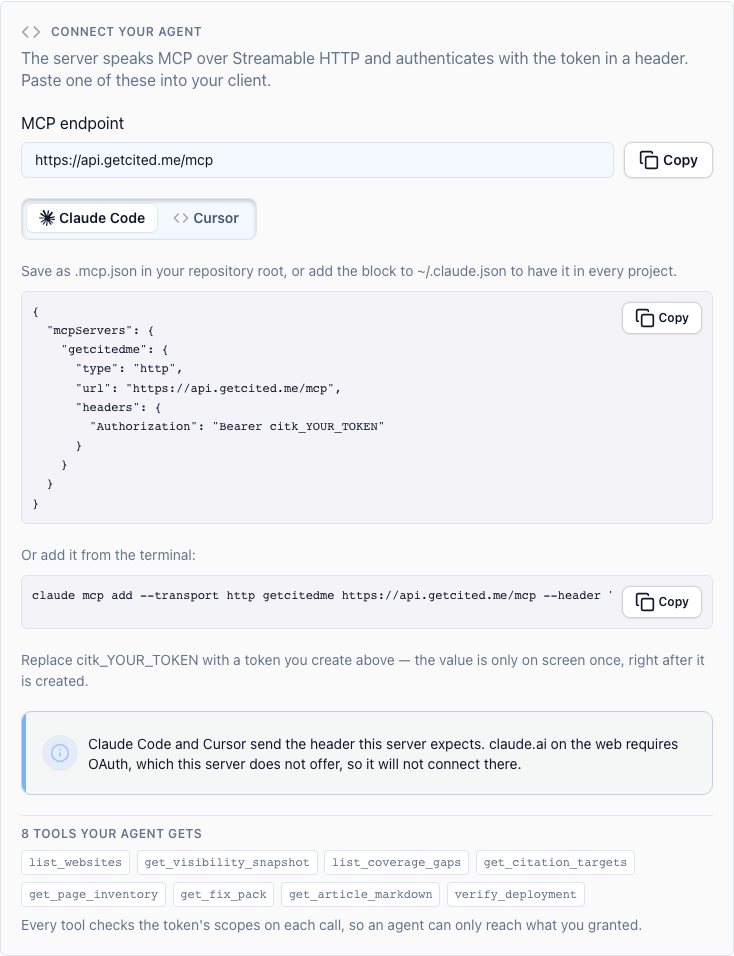
About other clients. claude.ai on the web connects to remote servers through OAuth, which this server deliberately does not offer — a token you can see, scope and revoke is a smaller thing to trust than an account-wide sign-in. The Claude desktop app we have not tested, so we publish no steps for it rather than steps that might not work.
The eight tools
| Tool | What it gives the agent |
|---|---|
list_websites |
Your projects, with plan and billing state |
get_visibility_snapshot |
The score and its breakdown, today against yesterday, and who is above you |
list_coverage_gaps |
Questions where you are invisible, each marked as needing content or an entity fix |
get_citation_targets |
Where answers in your category already look — directories, videos, authors |
get_page_inventory |
Every crawled page with its citation score, quick-win points and specific fixes |
get_fix_pack |
The deployable files from an audit — llms.txt, ai.txt, robots.txt, JSON-LD, FAQ markup — each with the path it belongs at |
get_article_markdown |
A finished draft as markdown, ready for your content directory |
verify_deployment |
Re-fetches your live site and diffs it against what the audit expected |
The last two are why this is worth connecting rather than reading dashboards. get_fix_pack hands the agent real files and where they go; verify_deployment then proves they actually reached the live site — which catches the case every team hits eventually, where the file is in the repository, the build passed, and the site still serves the old one.
What to ask it
Start with a question that needs no setup:
Read my visibility snapshot from GetCited.me. What is my score, how did it move since yesterday, and which brands are above me?
Then the one that does real work:
Get my latest fix pack from GetCited.me and write every deployable artifact to the path it belongs at in this repository. Skip anything marked reference-only — that is what is already live. Show me the diff before you commit.
And after you deploy:
Run verify_deployment for my site and tell me which files are actually being served and how they differ from what the audit expected.
A few more, worth a standing schedule: triage coverage gaps weekly, sort the page inventory by quick-win points monthly, and pull citation targets when you are planning outreach.
What it will not do
It will not publish an article, change a setting, spend an answer credit or start a tracking run. Every tool is a read, and verify_deployment — despite its write-shaped scope — only re-fetches your own public pages and compares them. If you want the agent to change something, it changes files in your repository, and you review the diff like any other change.